

Domino's Pizza USA review
 Analysis by GetAllApps
I think the Domino’s app makes the most sense when I treat it as a practical ordering tool, not as a general restaurant-discovery app. It is built around ordering from Domino’s Pizza USA, and the useful question is less “What should I eat tonight?” than “How can I place this particular pizza order with as little back-and-forth as possible?” If you already know the kind of meal you want, that focus is a strength. If you are comparing restaurants or looking for a broad menu of cuisines, I would start somewhere else.
In the Food & Drink category, Domino’s Pizza USA is a free app from Domino’s Pizza LLC. It is rated for Everyone, and its Android release history goes back to February 21, 2012. The current version is 13.11.3, with Android 9 as the minimum operating system. Its 4.6 average from around 2.4 million ratings and more than 10 million installs suggest that it is a familiar choice for a lot of customers, though popularity does not guarantee that every order will suit every person.
Getting from a craving to a complete order
The basic workflow is straightforward in concept: choose what you want, build the order, and follow it through the app. The value is greatest when you arrive with a rough plan. Decide whether you are ordering for yourself, sharing, or feeding a group before you start tapping; that makes it easier to judge sizes, toppings, sides, and drinks as one meal instead of adding items impulsively.
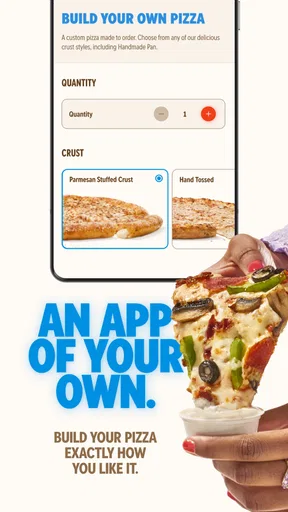
For a first order, I would slow down at the customization stage. Pizza choices can look simple until a group has different preferences, so check each selection before moving on. If one person wants a plain portion and someone else wants extra toppings, confirm how the chosen pizza is configured rather than assuming the app will interpret a vague request the way you do. The screen is convenient, but the person ordering still needs to make the decisions clearly.
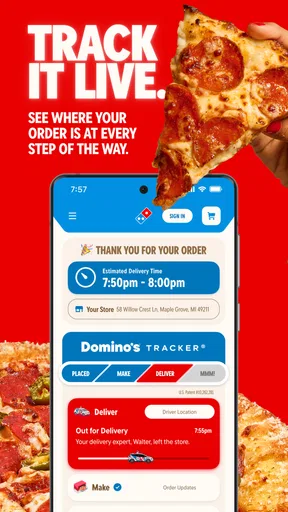
The Domino’s Tracker® is the most distinctive part of the experience. I find it useful as a progress check after placing an order, particularly when several people are waiting and asking when food will arrive. It gives the order a visible sequence rather than leaving you to wonder whether anything is happening. I would treat that as a helpful guide, not a reason to plan a tight schedule around an exact moment: a progress display can reduce uncertainty, but it cannot make a busy evening predictable.
A realistic use case is a weeknight when you get home late and want dinner sorted before everyone starts proposing separate alternatives. I would open the app, settle on a shared order, review the customizations once, and then use the tracker to keep the household informed. That is a better fit than passing a phone around with no agreed plan, because it reduces repeated discussion while keeping the final choices in one place.
Before submitting, I recommend a deliberate last check: read the item names, inspect the selected options, and make sure the order reflects the group’s actual preferences. This is especially worthwhile when ordering several pizzas or adding sides, since a small selection mistake becomes more noticeable when the food is meant for other people. A few seconds of review are more useful than assuming that a fast checkout is automatically an accurate one.
Settings and choices worth checking
I would begin with the practical basics that affect how you use any ordering app: make sure the device is running a supported Android version, and review the choices the app presents during setup and ordering. The minimum Android requirement is version 9, so an older device may not be able to use the current release. On a compatible phone, keeping the app current is a sensible habit if you rely on it for repeat orders.
Next, pay attention to the order details rather than rushing toward checkout. Choose the options that match how you actually eat, and read the final summary before confirming. This is not a glamorous tip, but it is one of the most reliable ways to avoid an order that is technically complete yet wrong for the people sharing it. If you have a particular preference or restriction, do not assume that an item name alone tells the whole story; inspect the choices shown in the app.
Think about pickup versus delivery as a decision to make for the occasion, not as a setting to ignore. The better option depends on your plans: pickup may suit someone already passing the restaurant, while delivery is more convenient when leaving home would be a nuisance. I would compare the actual choices shown for the order and your circumstances rather than assume one method is always faster or better.
One useful habit is to separate “what I usually order” from “what this group needs tonight.” A familiar pizza can be an easy starting point, but a family meal, a solo dinner, and a gathering with mixed tastes call for different checks. For a group, I would verify toppings and quantities together; for a solo order, I would pay more attention to avoiding unnecessary extras. The app helps assemble the order, but it cannot decide what is sensible for your appetite or budget.
Repeatable habits that make ordering smoother
Experienced use is mostly about reducing avoidable decisions. I find it helpful to settle the meal plan before opening the menu: number of people, any firm preferences, and whether the order needs sides. That prevents the common loop of browsing, changing direction, and then rebuilding the basket. It also makes the app feel less like a distraction when you are hungry and trying to get dinner underway.
For a regular household order, keep a mental note of the combination that works: which pizza choices people agree on, what tends to be left over, and which additions are genuinely worth including. Then use that as a checklist on later visits rather than blindly reproducing every previous choice. The trade-off is important: repetition saves time, but it can also preserve a mistake or lead to ordering more than you need. Review the current order every time.
When ordering for friends, I would gather preferences before placing the order instead of asking people to make changes while the basket is nearly finished. A quick conversation about toppings and sides can prevent the person holding the phone from guessing. If opinions conflict, choose a combination that is easy to explain and check each item carefully. That small bit of coordination is more effective than expecting an app interface to resolve a group decision.
The tracker is most useful when I give it a clear job: answer “Where is the order in its progress?” rather than “Can I guarantee exactly when dinner will be ready?” That distinction keeps expectations realistic. If people are waiting, I can share a simple update based on what the app shows, while still allowing for ordinary variation in the evening. It is a modest feature, but it solves a real friction point that a plain digital menu would leave untouched.
I also would not use the app as a reason to skip checking the order confirmation. Keep an eye on what you have actually submitted, especially after making several customizations. If something looks off, dealing with it promptly is more useful than discovering the mismatch when everyone is ready to eat. The best shortcut is not tapping faster; it is making fewer corrections by reviewing the important details once.
Where a specialist ordering app reaches its limits
The same focus that makes this app convenient also narrows its appeal. It is for Domino’s, so it is not a neutral tool for comparing local pizza shops, checking a range of restaurants, or finding a different kind of food. If you are undecided about cuisine or want to compare several providers in one place, a general delivery service or local restaurant listings will be more useful.
It is also not the right choice if you would rather speak directly with a restaurant about a complicated request. An app is efficient when the available options cover what you need; it is less comfortable when your order depends on a detailed explanation or a special arrangement. I would not assume that typing or selecting something in a digital flow guarantees that every unusual request can be accommodated. For a meal where precision is critical, use the ordering method that lets you communicate clearly.
Another limitation is that a progress tracker can create a stronger sense of certainty than the situation deserves. Seeing stages move forward is reassuring, but I would not use it to coordinate an event down to the minute. If dinner is part of a tight plan, leave breathing room. The tracker is best understood as visibility into the order’s progress, not a promise that every handoff will happen at a precise time.
Convenience can also encourage over-ordering. Browsing add-ons while building a meal makes it easy to include items that sounded good in the moment but do not fit the group’s appetite. I recommend deciding on the meal size first and treating extras as deliberate choices. That approach is especially helpful when ordering for one or two people, where an appealing basket can quickly become more food than the occasion calls for.
For iPhone users, the app’s US-focused identity is worth keeping in mind: this review concerns Domino’s Pizza USA, not a universal Domino’s ordering experience for every country. The Android requirements and version details apply to Android use, while the core decision for any phone owner remains the same: it is most useful when you want to order from this specific chain and the options presented fit your needs.
Who I would recommend it to
I would recommend Domino’s Pizza USA to people who already choose Domino’s now and then, value placing an order from their phone, and like being able to check its progress afterward. It is particularly practical for a household with a familiar routine, a casual group meal, or a busy evening when getting everyone to agree on dinner matters more than exploring new restaurants.
I would suggest skipping it if you are mainly looking for a restaurant-comparison tool, want broad cuisine choices, or need to discuss unusual instructions before ordering. Someone who prefers choosing in person or talking through every detail may find a direct conversation more reassuring. Likewise, if you are ordering for a group with very different tastes, the app can organize choices, but it cannot replace the conversation that decides what those choices should be.
The app has a substantial audience, with around 895,000 reviews alongside its large rating count, but I would use those figures as context rather than as a substitute for fit. A high average rating can tell me that many people find the experience worthwhile; it cannot tell me whether the available menu and ordering process match my own plans. The free price makes trying it a low-commitment way to see whether its workflow suits you.
My verdict after looking at the whole routine
For me, this is a focused, useful ordering app rather than an all-purpose food platform. Its strongest combination is a direct path to a Domino’s order and the ability to follow progress afterward. I like it most when I know what I want, have checked the details, and need a practical way to coordinate dinner without repeated calls or messages.
My main advice is to use a repeatable routine: agree on the meal, customize carefully, review the completed order, and use the tracker for updates without treating it as an exact countdown. That workflow brings out the app’s real convenience while avoiding its predictable frustrations. If Domino’s is already one of your regular choices, I think it is worth keeping on your phone. If your priority is comparing restaurants or handling a highly specific request, another approach will serve you better.
Pros and cons
Pros
- Order pizza for pickup or delivery from the app.
- Customize crusts and toppings before placing an order.
- Save favorite orders for quicker repeat purchases.
- Track an order through preparation and delivery.
- Find nearby Domino's locations with store details.
Cons
- Delivery availability varies by location.
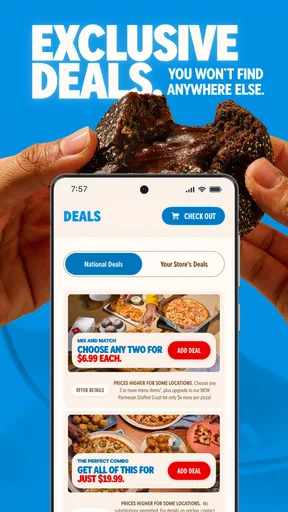
- Promotions may have eligibility rules or exclusions.
- Menu prices can differ between stores.
- Customizing an order can make checkout feel lengthy.
- Some orders may require a minimum purchase for delivery.


